Enquiries and bookings remain in chat histories
Support must confirm times, locations, services and prices individually, risking missed orders and repeated discussions.
 Jianxu Digital JIANXU DIGITAL
Mini Program · App · Mobile Business
For bookings, transactions, membership, dispatch, field work, inspections and ongoing services. We assess mini programs, H5, cross-platform or native apps, then design user interfaces, APIs and administration together.
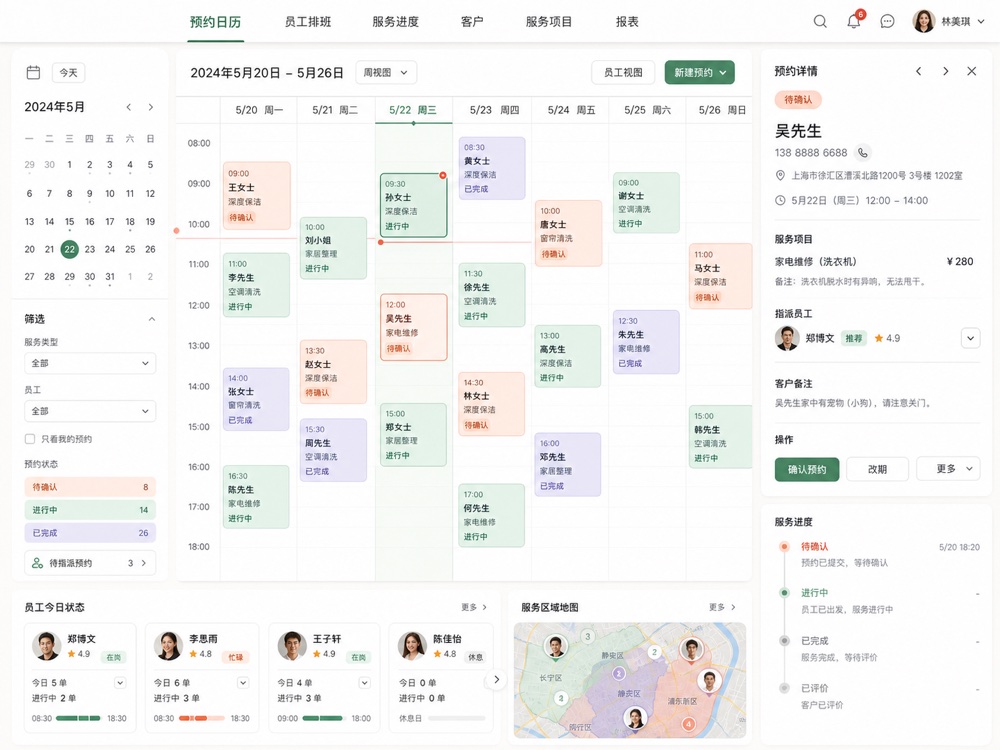
Mini programs often suit infrequent use and WeChat acquisition. Assess standalone apps for frequent use, complex interactions, push notifications, offline work or deeper device capabilities.
Support must confirm times, locations, services and prices individually, risking missed orders and repeated discussions.
Users, staff and administrators see inconsistent information with no shared service state.
Customers can order, but scheduling, refunds, redemption, customers and data remain in spreadsheets.
Building mini programs, iOS and Android before validating frequent tasks can make budgets and maintenance unmanageable.
Accounts, transactions, states, notifications and exceptions are the hard part, beyond reproducing design screens.
User, staff and operations roles, key states, failure paths and clickable prototypes.
Login, forms, orders, payments, location, scanning, uploads and messaging.
Accounts, permissions, orders, customers, fulfillment, content, configuration and statistics.
Cross-platform tests, platform setup, releases, source code and deployment instructions.
Bookings, transactions, field work, devices and membership have different data structures and cannot share a single page-list estimate.
Services, slots, locations, staff, bookings, reminders, redemption and reviews.
For: Beauty / Repairs / Consulting / Training / VenuesProducts, inventory, carts, payments, orders, promotions, points and after-sales.
For: Brand retail / Private-channel stores / Wholesale orderingTasks, location, scanning, photos, forms, signatures, exceptions and offline handling.
For: Inspections / Installation / Maintenance / DeliveryDevice records, repair requests, progress, parts, conversations and satisfaction.
For: Equipment support / Property services / Professional servicesNetwork setup, device lists, status, scenarios, alerts, remote control and household sharing.
For: Smart hardware / Homes / Professional equipmentTasks, approvals, customers, projects, inventory, reports and enterprise messages.
For: Mobile offices & frontline teamsThis content comes from a delivered project. Client names, production data and some business details are anonymized for confidentiality. Interfaces are redrawn from the actual system structure and do not show raw production data.
Mini programs often suit WeChat acquisition, lower frequency or initial transaction validation. Assess apps for frequent use, complex interactions, offline work, push notifications or deeper device access.
Business projects typically need it. The quote specifies included order, scheduling, staff, customer, content and analytics functions.
Development and integration work may be included. WeChat verification, SMS, payment channels, maps and other third-party fees are charged by providers and listed separately.
Yes, with suitable API, account and business-model design in the first phase. Interfaces and platform capabilities still need app-specific adaptation; migration is not automatically cost-free.
Tell us who the users are, how they currently work and where errors occur most often.
Booking reviews, dispatch, inventory, refunds and service progress usually require staff or admin access. Plan roles and processing together in the first phase so collected information can move forward.
No. Payment, order and fulfillment are related but separate states. Handle duplicate callbacks, timeouts, cancellations, refunds and notification failures using server verification and business records rather than page redirects.
Walk through order creation, confirmation, dispatch, fulfillment and feedback in real business order. Test overbooking, cancellation and staff changes. Validate devices, platform permissions and special APIs before committing to full scope.