Skip to content

Business System · CRM · ERP · Workflow

A business system goes beyond moving spreadsheets online.
It unifies workflows, data and responsibility.

For teams whose customers, orders, inventory, projects, approvals and analytics are spread across Excel, WeChat groups or legacy systems. We define master data, state transitions and permissions before building frontends, backends, databases and admin consoles.

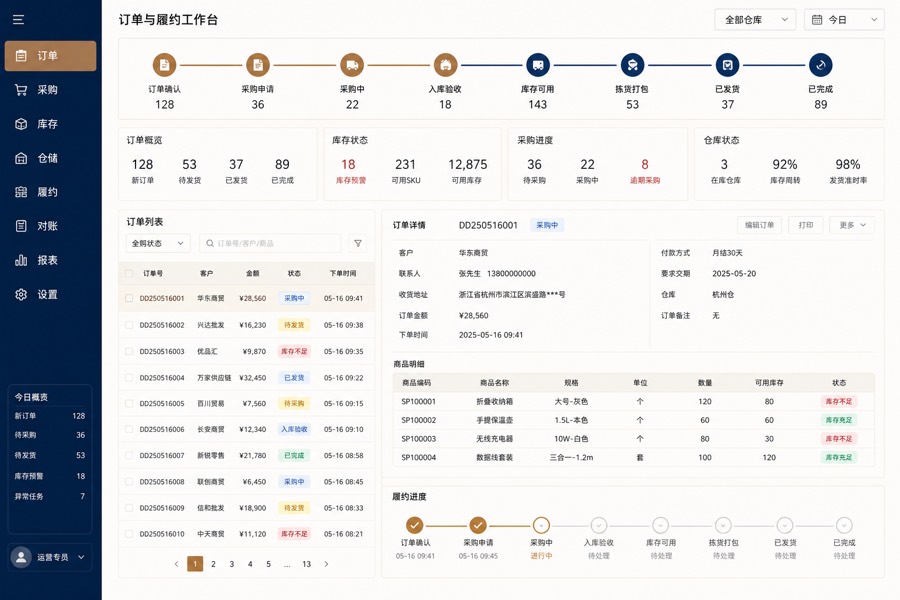
Enterprise order, inventory, purchasing and fulfillment interface

When should we build a business system?

When spreadsheets, chat messages and manual follow-up affect delivery, payments, inventory or traceability, start with one core workflow.

How large should the first phase be?
Connect a clearly valuable workflow such as lead-to-payment, purchase-to-receipt or booking-to-fulfillment. Avoid replacing all systems at once.
What about historical data?
Check fields, duplicates, missing values and definitions, then choose cleaning, migration, read-only archiving or parallel operation.
How do we know it works?
Accept real roles, data, exceptions, permissions and reporting definitions individually, then observe actual use and business outcomes after launch.

Learn more: Fixed-investment launch plan Assess whether you need a system Request a scope assessment

Master data Customers · Products · Materials · Projects Business workflows Orders · Inventory · Approvals · Fulfillment Permissions & audits Roles · Data scope · Activity logs Business analytics Progress · Risks · Receivables · Dashboards
Relevant scenarios

The business is running, but cross-team coordination and reconciliation keep slowing down.

Define one main workflow so statuses and responsibilities become visible.

01

The same customer is maintained in several tools

Sales, projects and finance keep separate lists with inconsistent owners, contracts and payment definitions.

02

Orders and inventory are synchronized manually

Changes, cancellations, returns and counts lack shared records, creating extensive month-end reconciliation.

03

Project progress exists only in chat groups

Tasks, risks, acceptance and payments do not form a management overview.

04

Legacy systems cannot support new operations

Missing APIs, permissions and maintainable documentation force teams to work around the system.

Business & engineering architecture

Define business states and data relationships before designing screens.

Screens are access points; data models, state machines, permissions, audits and exception handling form the core.

01 · ExperienceAdmin console / Mobile interface / Customer portal Provide role-specific tasks and data access
02 · DomainCustomers, orders, inventory, projects & approvals Separate services and states by business boundaries
03 · FoundationAuthentication, RBAC, audits, files & tasks Shared engineering capabilities support multiple modules
04 · Data & IntegrationDatabases, caches, search, messages & APIs Connect historical data and third-party systems

Key design decisions for complex projects

Master data governance
Unique identifiers, field definitions, history, import rules & data owners
State machines
Allowed transitions, operators, prerequisites, failure compensation & reversal
Permission model
Roles, data scope, field access, approval authority & audit logs
System integration
API contracts, idempotency, retries, queues, reconciliation & integration monitoring
Implementation & delivery

Choose one workflow for the first release instead of replacing every tool.

Business discovery

Workflow, role & scope baseline

Existing spreadsheets, documents, states, exceptions, responsible roles and initial boundaries.

System design

Prototypes, data models & APIs

Key screens, entity relationships, permission matrix, state definitions and integration plan.

Engineering development

Frontend, backend, database & testing

Admin console, APIs, tasks, reports, imports, exports and automated tests.

Migration & launch

Data, deployment & team handover

Historical data validation, permission setup, training, backups and operations documentation.

Core acceptance checks Core workflow states are traceable Role and data access match the permission matrix Critical data supports import, export and reconciliation Logs, backups and recovery procedures work
Types of business systems

System names are entry points; objects, states, rules and responsibilities need definition.

CRM, ERP, WMS and project systems often overlap. Define master data and boundaries around one workflow before naming modules.

01

CRM & sales collaboration

Leads, customers, contacts, opportunities, quotes, follow-ups, contracts and payments.

Focus: Ownership / Stages / Reminders / Data permissions
02

Order & fulfillment management

Ordering, review, scheduling, delivery, shipping, receipt, after-sales and reconciliation.

Focus: State machines / Exceptions / Notifications / Reconciliation
03

WMS & asset management

Materials, warehouses, locations, batches, serial numbers, scanning, counts and movements.

Focus: Record accuracy / Traceability / Mobile operations
04

Project & delivery systems

Initiation, contracts, tasks, hours, deliverables, costs, risks and acceptance.

Focus: Cross-team collaboration / Milestones / Responsibility
05

Approvals & internal workflows

Applications, conditions, steps, joint approvals, copies, timeouts, archives and audits.

Focus: Rule configuration / Permissions / Activity records
06

Business analytics & data platforms

Shared metrics, dashboards, reports, data permissions, imports, exports and exception reminders.

Focus: Definitions / Sources / Updates / Traceability
Real project case · Client information anonymized

Project businesses: connect leads, contracts, tasks and payments beyond separate spreadsheets.

This content comes from a delivered project. Client names, production data and some business details are anonymized for confidentiality. Interfaces are redrawn from the actual system structure and do not show raw production data.
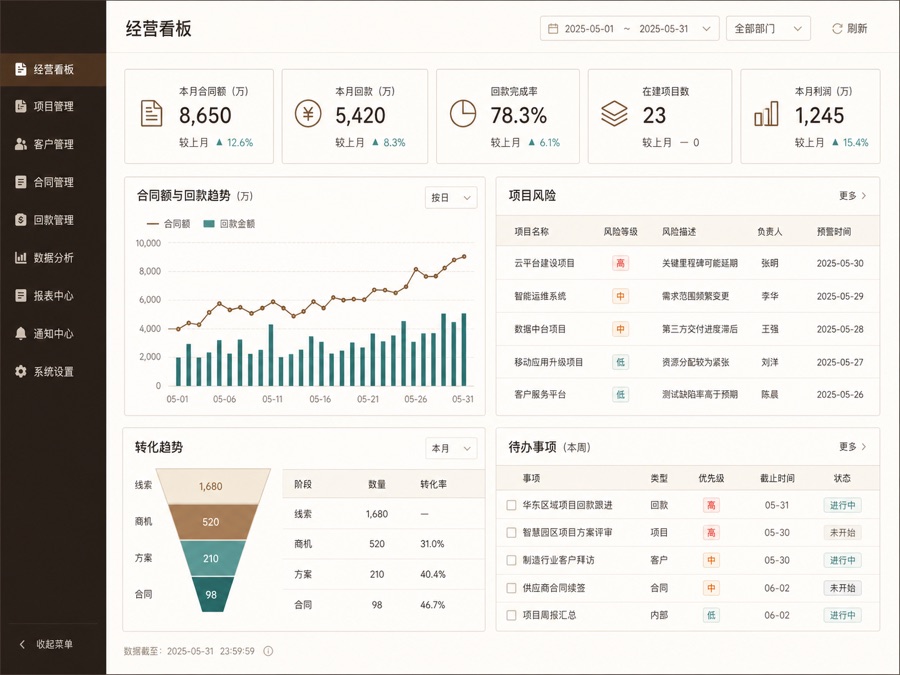
Anonymized redraw of a customer, project, contract and payment dashboard
Anonymized interface redraw · Non-production data
Real project / Client information anonymized

One workflow from sales commitment to delivery and payment

Project background
Sales, project and finance teams maintained separate spreadsheets, making scope, delivery status and payment risks hard to synchronize.
First phase
Unify six core records: customers, contracts, projects, milestones, invoices and payments.
System components
CRM, project workspace, contracts and payments, permission audits and dashboards.
Acceptance method
Review states, permissions, reminders and metric definitions from a new lead to project completion.
FAQ

Custom business system FAQ

Can we begin without complete requirements?

Yes. Existing spreadsheets, documents, conversations, systems and interviews can establish the workflow and scope baseline.

Must every department join the first release?

Usually not. Prioritize one valuable workflow such as lead-to-payment or purchase-to-receipt, then expand after validation.

Can historical Excel data be imported?

Yes, after checking fields, duplicates, missing values and definitions. Cleaning effort affects timing and pricing.

Can it connect to existing finance, ERP or third-party platforms?

Yes, where stable APIs, permissions and documentation are available. API limits, sync frequency, failure recovery and reconciliation require separate assessment.

Share the most difficult spreadsheet and workflow to define the first release.

We start with data, states, roles and exceptions before listing features.

Submit business system requirements

Business system development: project assessment FAQ

When is custom development worthwhile?

Consider it when repeated entry, status checks or reconciliation affect delivery and standard tools cannot support critical rules at reasonable cost. For unvalidated businesses, few users or rapidly changing workflows, begin with existing tools and prototypes.

What should the first phase cover?

Choose an input-to-result workflow such as purchase-to-receipt or lead-to-payment, with clear roles, states, data sources and exceptions. Cross-team reports should use shared business objects rather than being built before data definitions are aligned.

How should old spreadsheets and historical data be handled?

Sample duplicates, missing values, definitions and relationships before deciding migration scope. Separate data into migration, read-only archives and deferred cleanup, and reconcile record counts and key totals before and after import.